Static analysis of Axiscard.apk (2)
A clean dropper (com.example.installerapp) with an unencrypted nested payload that trades Firebase for Supabase: VPN-blocking installer, SMS interception at max priority, and a PostgREST write-only exfiltration backend.
This is rather straight-forward. The APK comes from a github profile spreading malicious repos in various forms.
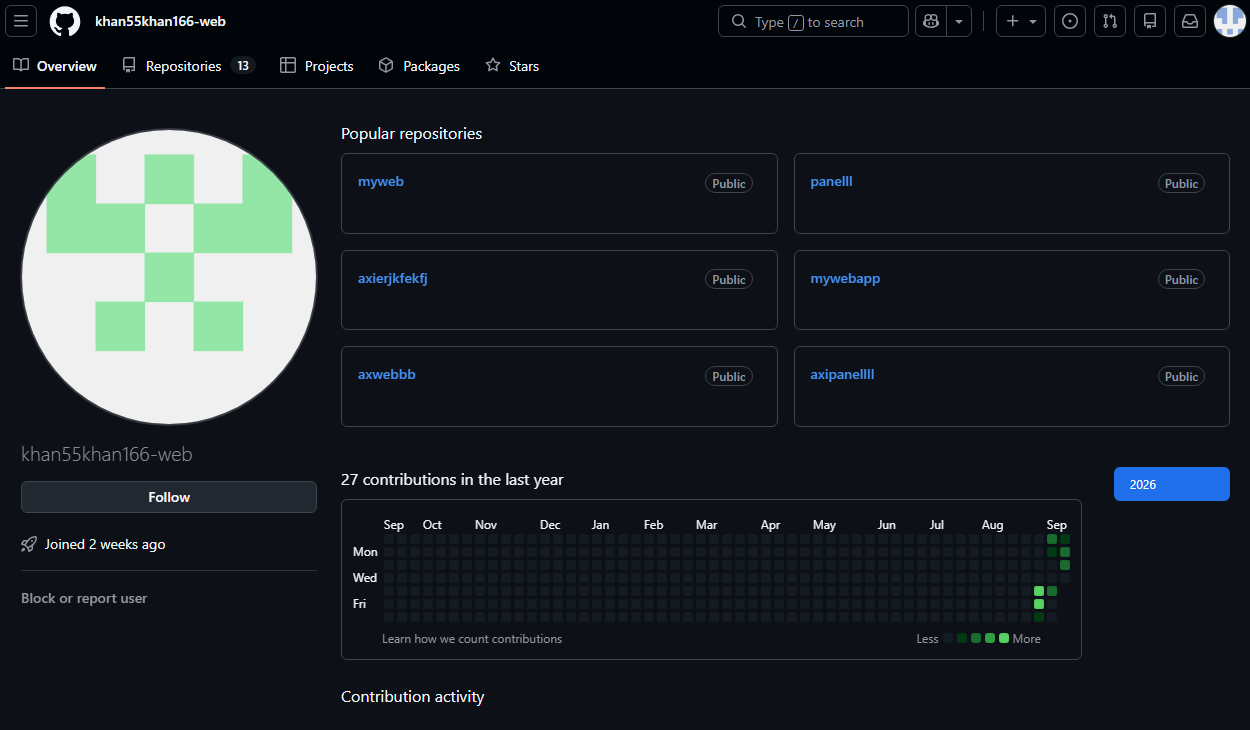
The github profile above is spreading various things through its repos some of which are clearly malicious some are...more interesting I would say (more detailed in upcoming writeup). So far I have seen the familiar "Axiscard"/"axiscard" APK in a repository:
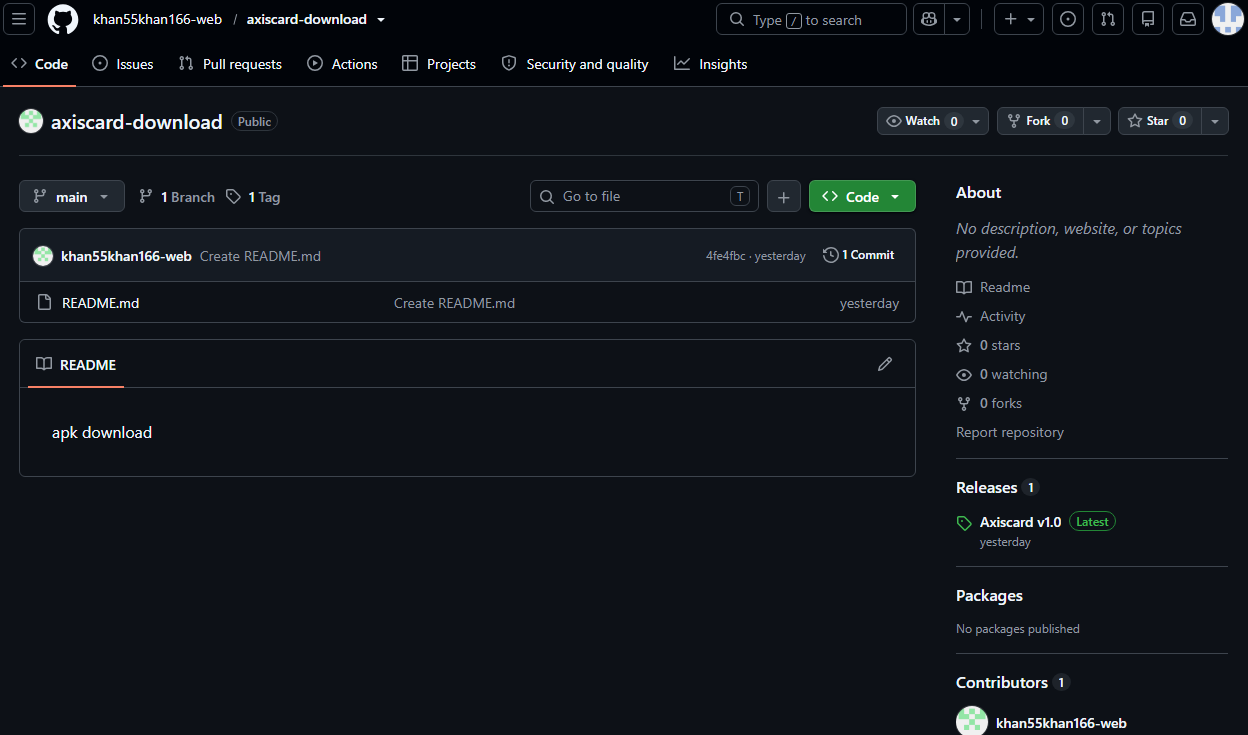
As always it is good practice to get the full picture of apk which includes getting hashes and such: Axiscard.apk (2)
- SHA-256 -
842bd615a21b954af6a7ff62b45872f09484666c985adfe2987f5b15c5835eda - SHA-1 -
2125057a06961b943a9c67006abfb897ea045e6e - MD5 -
29d4934f6d2d61d8e44530919a4e389f
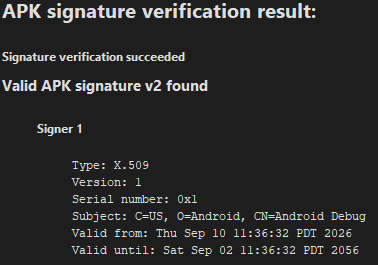
It's APK signature is useless as it of course does NOT have the signature of the person who made the APK and is self signed.
and,

Now that certain things are out of the way we can move onto the analysis of the APK itself.
First comes the AndroidManifest.xml
As established in my first two write-ups, a manifest should be the first thing anyone doing static analysis should look for as they tend to lay some idea that what kind of an app it is. Also as is tradition, here is the full manifest:
<?xml version="1.0" encoding="utf-8"?>
<manifest xmlns:android="http://schemas.android.com/apk/res/android"
    android:versionCode="1"
    android:versionName="1.0"
    android:compileSdkVersion="36"
    android:compileSdkVersionCodename="16"
    package="com.example.installerapp"
    platformBuildVersionCode="36"
    platformBuildVersionName="16">
    <uses-sdk
        android:minSdkVersion="24"
        android:targetSdkVersion="34"/>
    <uses-permission android:name="android.permission.INTERNET"/>
    <uses-permission android:name="android.permission.FOREGROUND_SERVICE"/>
    <uses-permission android:name="android.permission.FOREGROUND_SERVICE_SPECIAL_USE"/>
    <uses-permission android:name="android.permission.POST_NOTIFICATIONS"/>
    <uses-permission android:name="android.permission.REQUEST_INSTALL_PACKAGES"/>
    <queries>
        <intent>
            <action android:name="android.intent.action.VIEW"/>
            <data android:mimeType="application/vnd.android.package-archive"/>
        </intent>
        <package android:name="com.example.targetapp"/>
        <package android:name="com.google.android.packageinstaller"/>
        <package android:name="com.android.packageinstaller"/>
    </queries>
    <permission
        android:name="com.example.installerapp.DYNAMIC_RECEIVER_NOT_EXPORTED_PERMISSION"
        android:protectionLevel="signature"/>
    <uses-permission android:name="com.example.installerapp.DYNAMIC_RECEIVER_NOT_EXPORTED_PERMISSION"/>
    <application
        android:theme="@style/Theme.InstallerApp"
        android:label="@string/app_name"
        android:icon="@mipmap/ic_launcher"
        android:debuggable="true"
        android:allowBackup="true"
        android:supportsRtl="true"
        android:extractNativeLibs="false"
        android:roundIcon="@mipmap/ic_launcher_round"
        android:appComponentFactory="androidx.core.app.CoreComponentFactory">
        <activity
            android:label="@string/app_name"
            android:name="com.p118example.installerapp.MainActivity"
            android:exported="true">
            <intent-filter>
                <action android:name="android.intent.action.MAIN"/>
                <category android:name="android.intent.category.LAUNCHER"/>
            </intent-filter>
        </activity>
        <service
            android:name="com.p118example.installerapp.BlockingVpnService"
            android:permission="android.permission.BIND_VPN_SERVICE"
            android:exported="false"
            android:foregroundServiceType="specialUse">
            <intent-filter>
                <action android:name="android.net.VpnService"/>
            </intent-filter>
            <property
                android:name="android.app.PROPERTY_SPECIAL_USE_FGS_SUBTYPE"
                android:value="VPN service for network traffic routing"/>
        </service>
        <provider
            android:name="p004androidx.p049core.p052content.FileProvider"
            android:exported="false"
            android:authorities="com.example.installerapp.provider"
            android:grantUriPermissions="true">
            <meta-data
                android:name="android.support.FILE_PROVIDER_PATHS"
                android:resource="@xml/provider_paths"/>
        </provider>
        <receiver
            android:name="com.p118example.installerapp.InstallStatusReceiver"
            android:exported="true">
            <intent-filter>
                <action android:name="com.example.installerapp.ACTION_INSTALL_STATUS"/>
            </intent-filter>
        </receiver>
        <provider
            android:name="p004androidx.p109startup.InitializationProvider"
            android:exported="false"
            android:authorities="com.example.installerapp.androidx-startup">
            <meta-data
                android:name="p004androidx.p088emoji2.p089text.EmojiCompatInitializer"
                android:value="androidx.startup"/>
            <meta-data
                android:name="p004androidx.p097lifecycle.ProcessLifecycleInitializer"
                android:value="androidx.startup"/>
            <meta-data
                android:name="p004androidx.profileinstaller.ProfileInstallerInitializer"
                android:value="androidx.startup"/>
        </provider>
        <receiver
            android:name="p004androidx.profileinstaller.ProfileInstallReceiver"
            android:permission="android.permission.DUMP"
            android:enabled="true"
            android:exported="true"
            android:directBootAware="false">
            <intent-filter>
                <action android:name="androidx.profileinstaller.action.INSTALL_PROFILE"/>
            </intent-filter>
            <intent-filter>
                <action android:name="androidx.profileinstaller.action.SKIP_FILE"/>
            </intent-filter>
            <intent-filter>
                <action android:name="androidx.profileinstaller.action.SAVE_PROFILE"/>
            </intent-filter>
            <intent-filter>
                <action android:name="androidx.profileinstaller.action.BENCHMARK_OPERATION"/>
            </intent-filter>
        </receiver>
    </application>
</manifest>
Lets start dissecting. The first package which is called "com.example.installerapp", a fitting name because its main job is to install the payload which itself is in an APK format, more on that later. The manifest then declares the minimum sdk version with minSdkVersion:"24" and it is targeting the highest sdk version with targetSdkVersion:"34". This is a basic and normal step, taken to future proof an application. In this case it simply future proofs the scam. The main dropper (yes it is yet another dropper. A recurring theme I am seeing) then asks for certain few permissions. I have a long list of permissions I have found in previous APK analysis and uploaded them to [References] section where anyone can browse them therefore I will not be explaining certain permissions here and focus on new permissions if any.
<uses-permission android:name="android.permission.FOREGROUND_SERVICE_SPECIAL_USE"
this is a new permission candidate and a special one as well. It is a specific permission and foreground service type introduced in Android 14 (API 34) that serves a catch-all for foreground services that do not fit into other predefined categories like location, media, or camera. To use this type, developers must declare the permission in the manifest (which the app did) and specify specialUse in the android:foregroundServiceType attribute, which it it did: 
Because this type is broad, Google Play also requires developers to explicitly justify its usage. This is done by adding a <property> element named android.app.PROPERTY_SPECIAL_USE_FGS_SUBTYPE within the service declaration, providing a specific description of the use case which the APK indeed does properly: 
Oooh, a "VPN service for network traffic routing" this is getting interesting now. To give us a better idea regarding what it is about: 
I lied before when I only focused onspecialUseand provided the cropped screenshot like so, I had thought that I will tackle the "BIND_VPN_SERVICE"after I talk about the "FOREGROUND_SERVICE_SPECIAL_USE" however as you can tell the "BIND_VPN_SERVICE" & "FOREGROUND_SERVICE_SPECIAL_USE"are connected since the special use case itself is the damn VPN service.
The other important permission is one we have already visited before and it is the <uses-permission android:name="android.permission.REQUEST_INSTALL_PACKAGES"/> this permission is simple, it asks the user to enable a settings toggle for this particular app which lets the app open installer sessions and ask to install other apps. Needless to say that a legitimate banking app should not need to install other apps.
The rest of it
Three own classes in a 46KB DEX, fully readable, which makes this the most transparent dropper in the corpus.
MainActivity is a fake Play Store update screen with unusual operational honesty in its own logging: every state transition goes to both logcat (MainActivity tag) and an on screen diagnostics view (tvStatus, timestamped). The flow: prewarm assets/targetapp.apk to cache via coroutine; quadruple redundant install check (getPackageInfo, launch intent, explicit component resolve, launcher query); if present, transparent background, mark installed, hand off, exit. Otherwise show the theater: "Downloading… 2.0 MB" (the asset is 15MB), determinate progress bar driven by a 458 instruction coroutine, cancel button, "About this update" dialog ("Version 2.4.1 (2026.09.01), bug fixes and stability improvements"), diagnostics toggle.
Here targetapp.apk is the main payload and it is nested cleanly without any encryption (which makes our analysis job much much easier of course)
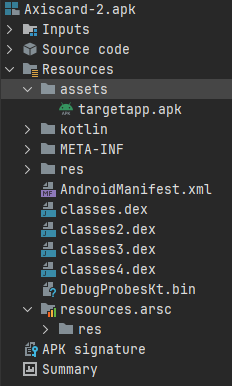
The "targetapp.apk" which is the actual payload will be analyzed later on in this writeup itself. KEEP READING.
Two gates precede everything, and both are fatal on refusal: VpnService.prepare() (decline → toast + finishAffinity) and MANAGE_UNKNOWN_APP_SOURCES (decline → reset UI + toast + finishAffinity). handleUpdateClicked starts the VPN before checking install permission, so the slot is held during the consent screens. performDirectInstall copies asset to cache, opens a PackageInstaller session pinned with setAppPackageName(TARGET_PACKAGE_NAME) and setSize, flips installFlags |= 4 (INSTALL_ALLOW_TEST) by reflection, sets user action required, writes as base_apk, commits with a broadcast status receiver, and falls back to a FileProvider VIEW intent (<package>.provider, flags 335544321) if the session path throws. The status callback (-1 → fire the system confirmation intent; 0 → success path: stop VPN, progress to 100, "Version 2.4.1 Installed", reveal Open App button, launch target with zero activity transition, finish). A PACKAGE_ADDED/REPLACED receiver independently confirms arrival.
BlockingVpnService (VpnService, Runnable): session "BlockingVpnSession", 10.0.0.2/24, addRoute("0.0.0.0", 0), MTU 1500, configure intent back to the installer, foreground notification "VPN Active: Blocking Route 0.0.0.0/0" (ID 2001), pump thread. Started on connect action, stopped on disconnect and unconditionally after successful install. The name states the purpose; there is no forwarding plane.
InstallStatusReceiver: status broadcast relay with a listener callback into the Activity.
Now that we have analyzed the main installer app we can now move onto the payload itself.
Analyzing the nested targetapp.apk
The targetapp.apk is the payload and the APK which gets installed by the Axiscard.apk. The targetapp.apk then takes control. The payload APK starts asking for permissions which will definitely help it exfiltrate as much data as possible from the victims's phone as well as the money of course (mainly money). The targetapp.apk comes under the package name= "com.example.targetapp" which is deliberately useless in identifying anything.
So what permissions does the payload APK use? the same old permissions (starting to notice a pattern here aren't you?):
    <uses-permission android:name="android.permission.INTERNET"/>
    <uses-permission android:name="android.permission.RECEIVE_SMS"/>
    <uses-permission android:name="android.permission.READ_SMS"/>
    <uses-permission android:name="android.permission.SEND_SMS"/>
    <uses-permission android:name="android.permission.RECEIVE_BOOT_COMPLETED"/>
    <uses-permission android:name="android.permission.FOREGROUND_SERVICE"/>
    <uses-permission android:name="android.permission.FOREGROUND_SERVICE_DATA_SYNC"/>
    <uses-permission android:name="android.permission.WAKE_LOCK"/>
    <uses-permission android:name="android.permission.POST_NOTIFICATIONS"/>
    <uses-permission android:name="android.permission.REQUEST_IGNORE_BATTERY_OPTIMIZATIONS"/>
WE ARE GOING TO FOCUS ON FEW PERMISSIONS ONLY
<uses-permission android:name="android.permission.INTERNET"/>
Seemingly a staple of most scamming apps, this permission is what allows for the app to connect and access the internet and also to pull data from the victim's phone to their designated C2 (Command & Control).
<uses-permission android:name="android.permission.FOREGROUND_SERVICE_DATA_SYNC"/>
We have seen this permission few other times before. It is granted automatically at install however an app must declare which kind of job each foreground service does.
<uses-permission android:name="android.permission.REQUEST_IGNORE_BATTERY_OPTIMIZATIONS"/>
This permission simply allows for uninterrupted operation in the background for the payload to actually work, it also allows for the app to take as much juice from the battery of the smartphone as possible. This permission is complimentary to other permissions.
Continuing the Manifest:
<permission
 android:name="com.example.targetapp.DYNAMIC_RECEIVER_NOT_EXPORTED_PERMISSION"
 android:protectionLevel="signature"/>
<uses-permission android:name="com.example.targetapp.DYNAMIC_RECEIVER_NOT_EXPORTED_PERMISSION"/>
The permissions above are custom signature permission. A private permission the app defines and holds. protectionLevel="signature"means only apps signed with the same debug cert can obtain it. Its purpose is guarding dynamic registerReceiver(..., permission)calls so only this app's own components receive its internal broadcasts. Standard AndroidX scaffolding (Core generates these), this is not attacker tradecraft, but it confirms dynamic receivers exist beyond the manifest declared ones.
SmsBackgroundService (dataSync foreground)
Exported false, but enabled, foregroundServiceType="dataSync". This persistent worker holds a foreground notification slot (survives Doze and background kills) while doing network uploads.
<service
        android:name="com.p232example.p233targetapp.SmsBackgroundService"
        android:enabled="true"
        android:exported="false"
        android:foregroundServiceType="dataSync"/>
There is also,
<receiver

            android:name="com.p232example.p233targetapp.BootReceiver"
            android:enabled="true"
            android:exported="true"
            android:directBootAware="true">
            <intent-filter android:priority="2147483647">
                <action android:name="android.intent.action.BOOT_COMPLETED"/>
                <action android:name="android.intent.action.LOCKED_BOOT_COMPLETED"/>
                <action android:name="android.intent.action.MY_PACKAGE_REPLACED"/>
                <action android:name="android.intent.action.QUICKBOOT_POWERON"/>
                <action android:name="com.htc.intent.action.QUICKBOOT_POWERON"/>
<action android:name="com.example.targetapp.RESTART_SERVICE"/>BootReceiver: the persistence net
This is the most aggressive block in the file:
- Four boot triggers:
BOOT_COMPLETED,LOCKED_BOOT_COMPLETED(fires before first unlock, paired withdirectBootAware),MY_PACKAGE_REPLACED(re registers after the app itself updates),QUICKBOOT_POWERONplus the HTC vendor variant (com.htc.intent.action.QUICKBOOT-POWERON, for HTC devices whose boot broadcast differs). Every restart path on every OEM is covered. - Custom action
com.example.targetapp.RESTART_SERVICE: an internal tripwire (or its installer sibling) can broadcast to resurrect the service on demand. android:priority="2147483647"(Integer.MAX_VALUE): maximum ordered broadcast precedence, so this receiver runs before any competitor (including security apps) on the same broadcasts.exported="true"+directBootAware="true": reachable from other apps and alive pre-unlock. Exported plus a broad filter is the one genuinely risky combination here: any app on the device can fire these actions at it though the damage is limited to the starting its service.
Moving on,
        <receiver
            android:name="com.p232example.p233targetapp.SmsReceiver"
            android:permission="android.permission.BROADCAST_SMS"
            android:enabled="true"
            android:exported="true"
            android:directBootAware="true">
            <intent-filter android:priority="2147483647">
<action android:name="android.provider.Telephony.SMS_RECEIVED"/>SmsReceiver: the interception core
- Gated by
android:permission="android.permission.BROADCAST_SMS": the sender must holdBROADCAST_SMS, a signature level permission only the system (and the app itself, for its internal re broadcasts) possesses. This blocks third party spoofing of fake SMS intents into the receiver. - Same
INT_MAXpriority onSMS_RECEIVED: first access to incoming SMS, ahead of the default messaging app. OTPs are readable (and, withabortBroadcastcapability on this path in older APIs, suppressible) before the user ever sees them. directBootAware: SMS interception active before first unlock after reboot.exported=trueis mandatory for a system delivered SMS broadcast.
MainActivity: MAIN with no LAUNCHER
        <activity
            android:label="@string/app_name"
            android:name="com.p232example.p233targetapp.MainActivity"
            android:exported="true"
            android:windowSoftInputMode="adjustResize">
            <intent-filter>
                <action android:name="android.intent.action.MAIN"/>
Exported activity with only android.intent.action.MAIN and no LAUNCHER category: launchable by explicit intent (the installer fires it by component) but invisible in the app drawer. andjustResize keeps the Compose form usable with the keyboard open. This is the hiding mechanism, stated declaratively.
Providers: the Supabase angle
        <provider
            android:name="p005androidx.p220startup.InitializationProvider"
            android:exported="false"
            android:authorities="com.example.targetapp.androidx-startup">
            <meta-data
                android:name="p005androidx.p185emoji2.p186text.EmojiCompatInitializer"
                android:value="androidx.startup"/>
            <meta-data
                android:name="io.p281github.p282jan.p283supabase.p284auth.SupabaseInitializer"
                android:value="androidx.startup"/>
            <meta-data
                android:name="p005androidx.p198lifecycle.ProcessLifecycleInitializer"
                android:value="androidx.startup"/>
            <meta-data
                android:name="p005androidx.profileinstaller.ProfileInstallerInitializer"
                android:value="androidx.startup"/>
            <meta-data
                android:name="com.p278russhwolf.p279settings.SettingsInitializer"
                android:value="androidx.startup"/>
        </provider>
androidx.startup.InitializationProvider auto starts, among others, io.github.jan.supabase.auth.SupabaseInitializer, alongside EmojiCompat, lifecycle, profileinstaller, and russhwolf.settings initializers. A Supabase auth initializer running at startup means session management is live from process birth, before any screen shows. The p005/p220 prefixes are R8's package obfuscation applied to library namespaces (same for com.p232example.p233targetapp, the obfuscated form of the app's own package, confirming R8 with class repackaging ran over everything including the manifest references, which is why manifest names andobile source names differ textually while resolving identically).
ProfileInstallReceiver
        <receiver
            android:name="p005androidx.profileinstaller.ProfileInstallReceiver"
            android:permission="android.permission.DUMP"
            android:enabled="true"
            android:exported="true"
            android:directBootAware="false">
            <intent-filter>
                <action android:name="androidx.profileinstaller.action.INSTALL_PROFILE"/>
            </intent-filter>
            <intent-filter>
                <action android:name="androidx.profileinstaller.action.SKIP_FILE"/>
            </intent-filter>
            <intent-filter>
                <action android:name="androidx.profileinstaller.action.SAVE_PROFILE"/>
            </intent-filter>
            <intent-filter>
                <action android:name="androidx.profileinstaller.action.BENCHMARK_OPERATION"/>
Stock baseline profile installer (DUMP gated, three actions). Benign; ships with every profileinstaller dependency. Its presence confirms the build used baseline profiles for startup speed, another production build artifact sitting oddly beside debuggable="true".
Regarding Supabase in the targetapp.apk
public final class SupabaseClientKt {

    /* JADX INFO: renamed from: supabase */

    private static final SupabaseClient f18230supabase;


    static {

        SupabaseClientBuilder supabaseClientBuilder = new SupabaseClientBuilder("https://xxxxxxxxxxxxxxxxxxxxxxxxxxxx.supabase.co", "sb_publishable_xxxxxxxxxxxxxxx-axk91g_xxxxxxxx");

        SupabaseClientBuilder.install$default(supabaseClientBuilder, InterfaceC3865Postgrest.INSTANCE, null, 2, null);
        f18230supabase = supabaseClientBuilder.m15345build();
    }
    public static final SupabaseClient getSupabase() {
        return f18230supabase;
    }
}
Moving onto the backend side of things, and this is actually rather interesting. The app embeds io.github.jan.supabase, the community Kotlin SDK, also known as supabase-kt, rather than the official client. The relevant classes show up pretty clearly, SupabaseClientBuilder, install(Postgrest), PostgrestQueryBuilder, InsertRequestBuilder and RestRequestExecutor, with the data models being handled through kotlinx.serialization using @SerialName mappings and the generated $serializer classes. Only the PostgREST module is installed here. There are no Auth, Realtime or Storage imports anywhere in the application's own code. That one decision basically defines the entire backend relationship. The client is there for HTTPS CRUD requests against /rest/v1/, but there is no realtime subscription mechanism, no file upload capability and no user management through the client. The operator seems to have traded the realtime command functionality seen in the Firebase version for simplicity and instead uses polling on the victim side and a separate panel application on the operator side.
Client construction and session posture
Looking at SupabaseClientKt, the application creates one static Supabase client when the class is loaded. The builder is given the project URL and the publishable key, with the default timeouts and no custom headers being added. There is also no Auth module or token refresh wiring visible in the application. This is important because the Authorization: Bearer <key> header therefore carries the anon key itself rather than a user specific JWT. In other words, requests made by the application are anonymous from the database's point of view. There is no actual victim identity at the database layer. The separation is instead handled through values written into the rows, such as android_id, which are supplied by the client and trusted rather than being tied to an authenticated database identity. So anyone possessing the same key can interact with whatever rows the database policies allow, and with the relevant tables exposed this becomes considerably more interesting.
Write paths, three inserts and that's basically it
There are three obvious write paths in the application. The first is the applicant form, implemented through ApplicantFormScreenKt and the Applicant model. When the victim submits the form, the application builds a row containing full_name, email, mobile, date_of_birth, termsAccepted and then sends it to the applicants table through InsertRequestBuilder. The navigation flow here is worth mentioning because it goes splash → login → services → applicant → card_auth → success, meaning the applicant information gets submitted before the victim ever reaches the card collection stage. So even if the victim abandons the process later, the operator can potentially already have the victim's name and phone number.
Then comes the card auth screen, handled by CardAuthScreenKt and the CardAuth model. This one is rather less subtle. The application builds a row containing card_number, cvv, expiry_date, name_on_card and sends the whole thing with a single POST into card_auth. So we are talking about full PAN and CVV being stored together in one row, with no meaningful client side validation beyond the formatting applied to the fields.
The third path is the SMS capture mechanism. SmsReceiver receives SMS_RECEIVED, reassembles the PDUs and creates an SmsMessage object before inserting the data into sms_messages. The model contains sender and message_body. There is no visible batching and no obvious deduplication either, so one incoming SMS results in one POST. With the MAX_PRIORITY registration and the duplicate receiver associated with the service, duplicate insertion of the same OTP is entirely plausible, which also lines up rather nicely with the observed 21 rows despite there being fewer unique SMS events.
What is notably absent is just as important as what is present. There is no select, no update and no delete anywhere in the application's own code. The implant is essentially write only. It cannot read other victims' rows, modify existing state or poll the database for commands. This is different from the Firebase based implementation, where there was an obvious command path back towards the device. Here the victim application does not need that capability at all. The operator can work through the separate panel application against the same backend, while the victim side simply keeps writing data into it.
Read surface, what the open door exposes
Now we can stop looking at the code and actually see what the backend exposes. I probed the live Supabase endpoint using the hardcoded key from the APK and the results were rather revealing. card_auth returned HTTP 200 with 2 rows, containing the full PAN, CVV, expiry date and name, with the latest record being from today. sms_messages also returned HTTP 200, this time with 21 rows, exposing the sender and message body, including OTP messages, with the latest observed entry being from yesterday.
Then there is applicants, which returned 404. The obvious alternatives, sms, messages, cards, users and devices, also returned 404. Interestingly, the 404s are useful here because they suggest that the live schema is lining up fairly closely with the tables actually referenced by the application, rather than some much larger collection of guessed endpoints.
The awkward one is applicants. The code clearly attempts to insert into that table, yet the live endpoint does not expose it in the same way as the other two. This could indicate an RLS or permission difference, although given that the other two tables are open that seems less convincing. Another possibility is that the production table has a different name from the one present in the APK. It is also entirely possible that the lead collection flow is simply broken in the current deployment and the insert is failing silently.
Instead of simply talking about these various card_auth, sms_messages, etc tables and rows. One might say that I do not have proof that this APK is using Supabase as its victim database of various kind. They would be wrong, allow me to show you:
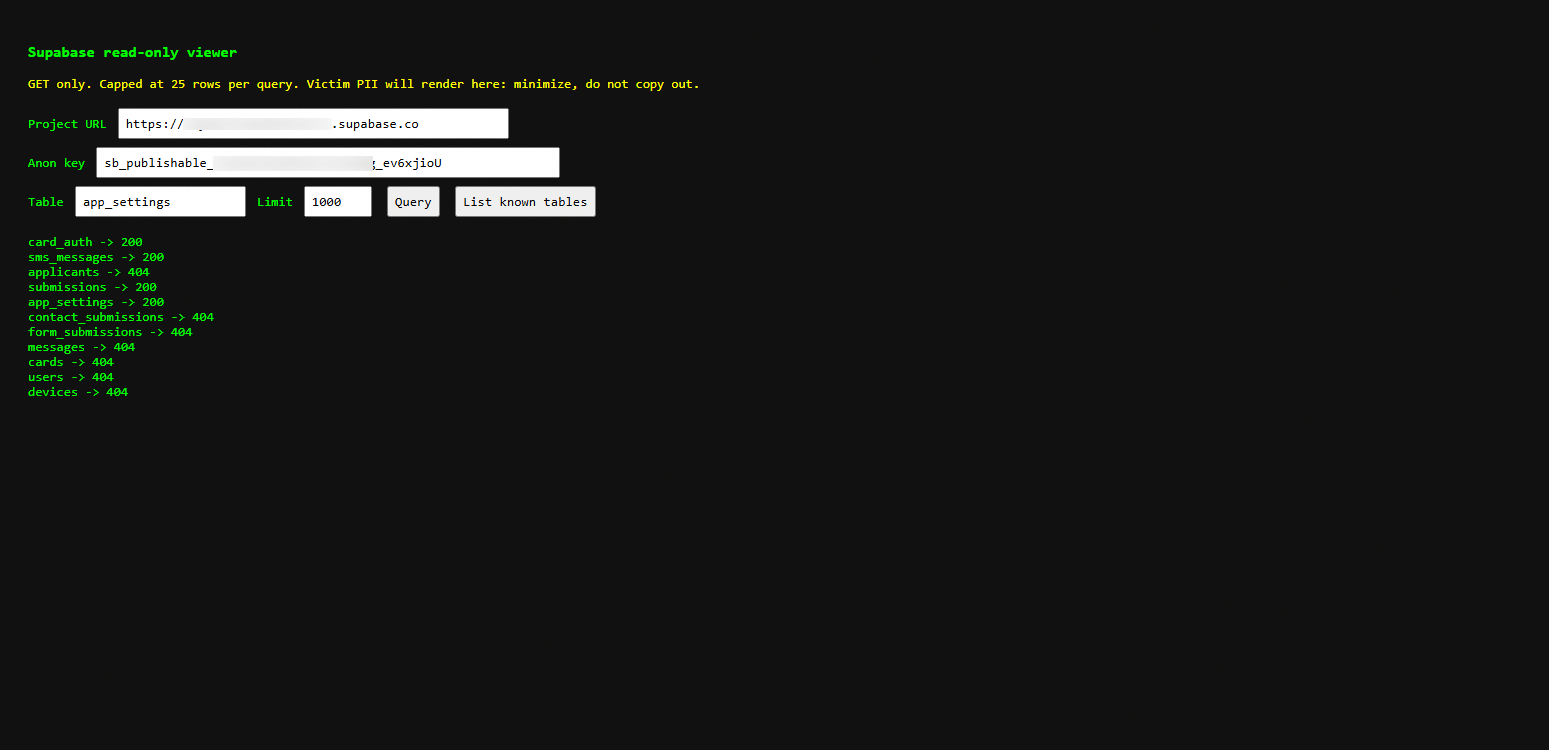
The sections with 200 are of course publicly readable and the 404 are the ones that are not publicly visible. Also disregard the, "GET only. Capped at 25 rows per query..." I had changed its limit to 1000 queries but forgot to remove that disclaimer/warning.
The sms_messages section gives us a good idea that how vast the attack is:
I had to resort to whole redaction for obvious reasons but I can still give the readers glances into what it looks like: Some faced unsuccessful login attempts into their legitimate Axis Bank Mobile App:

Some others had their transaction details (unclear if paid to the scam) and OTP details logged by the scammer in the Supabase:

Meanwhile other victims tried to frantically block their card but their request could not be processed at that time, conveniently:

The malicious APK logs all messages it can and keeps them in the database. It is capable of sending a message which contains the OTP, receiving and reading the message as well and therefore the victim does not need to insert it manually. The victim needs nothing to do at all besides watching their bank account get emptied.
With this I am drawing it to a close. I will definitely not be showing the card_auth section but I can instead show a heavily redactedsubmissions section:
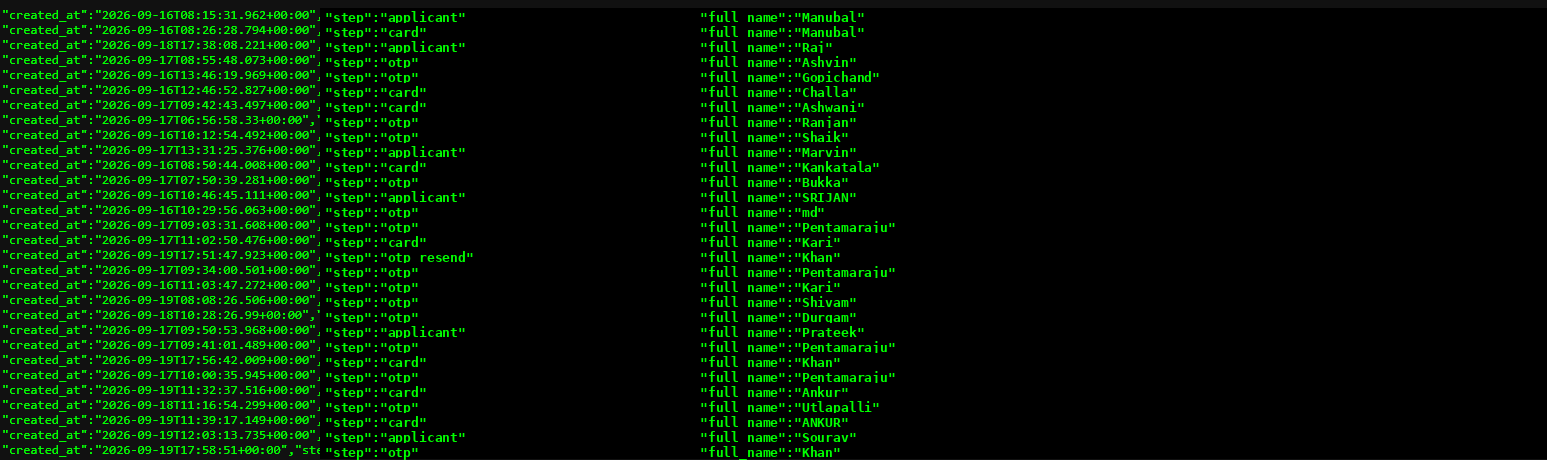
This is as much information I can show besides showing highly sensitive PII.
Closing
And with that, we have reached the end of this particular APK.
What started off as another rather ordinary looking Axiscard.apk turned out to be a fairly complete fraud chain once the pieces were put together. The outer APK acts as the installer and distraction, the nested targetapp.apk is where the actual functionality begins, and from there we have SMS interception, persistence through multiple boot triggers, background execution and the collection of payment related information.
The backend makes the whole thing a lot more interesting. The application embeds a Supabase client using the community supabase-kt SDK and communicates through PostgREST, with the victim side primarily acting as a write client. The live project then exposes tables such as card_auth, sms_messages, submissions and app_settings, with the latter containing what appears to be operational state used by the wider system. So this is not simply an APK stealing information locally, there is an entire backend structure sitting behind it.
There are still things I would want to investigate further, especially the panel application and exactly how the values in app_settings are consumed. I also would not consider the applicants path fully explained yet, since the APK references it while the live project returned a 404. Those are useful loose ends rather than reasons to speculate.
What is already clear, however, is the overall design. The victim sees a banking themed application, gets pushed through a sequence of forms and permissions, and the information collected along the way is sent into infrastructure controlled by the operator. The fact that several parts of that infrastructure were reachable with the key embedded in the APK only makes the implementation more interesting from an analysis perspective.
Although none of the individual pieces are particularly revolutionary. The interesting part is how many fairly simple components have been put together to create the complete operation.