Static analysis of rblcard.apk
RBL re-skin of the Axiscard dropper line: identical installer and manifest, rebuilt payload pointing to a new Supabase project, with live card and SMS tables proven writable.
This APK comes from the same Github profile as axiscard.apk report and holds the same targetapp.apk within the rblcard.apk. This nested design with the payload APK completely un-encrypted just kept there. Clearly this is sloppy work however not all of it to be exact because the rblcard.apk differs from the axiscard.apk even while having similar payload structure and delivery method is the different between the file sizes and the APK they carry. The nested APK in rblcard.apk has a different C2 (Command and Control) style where it uses a Supabase as their C2 (and yes it too is readable by the world and has the exact same parameters as the other payload APK which was within the axiscard.apk)
The rblcard.apk is meant to target the customers of Ratnakar Bank Limited which is an Indian private sector commercial bank. It is a simple re-skin of the axiscard.apk. In fact it is so much so similar both of them have the same package name as well as full identical copy of the android manifest and everything else as well:
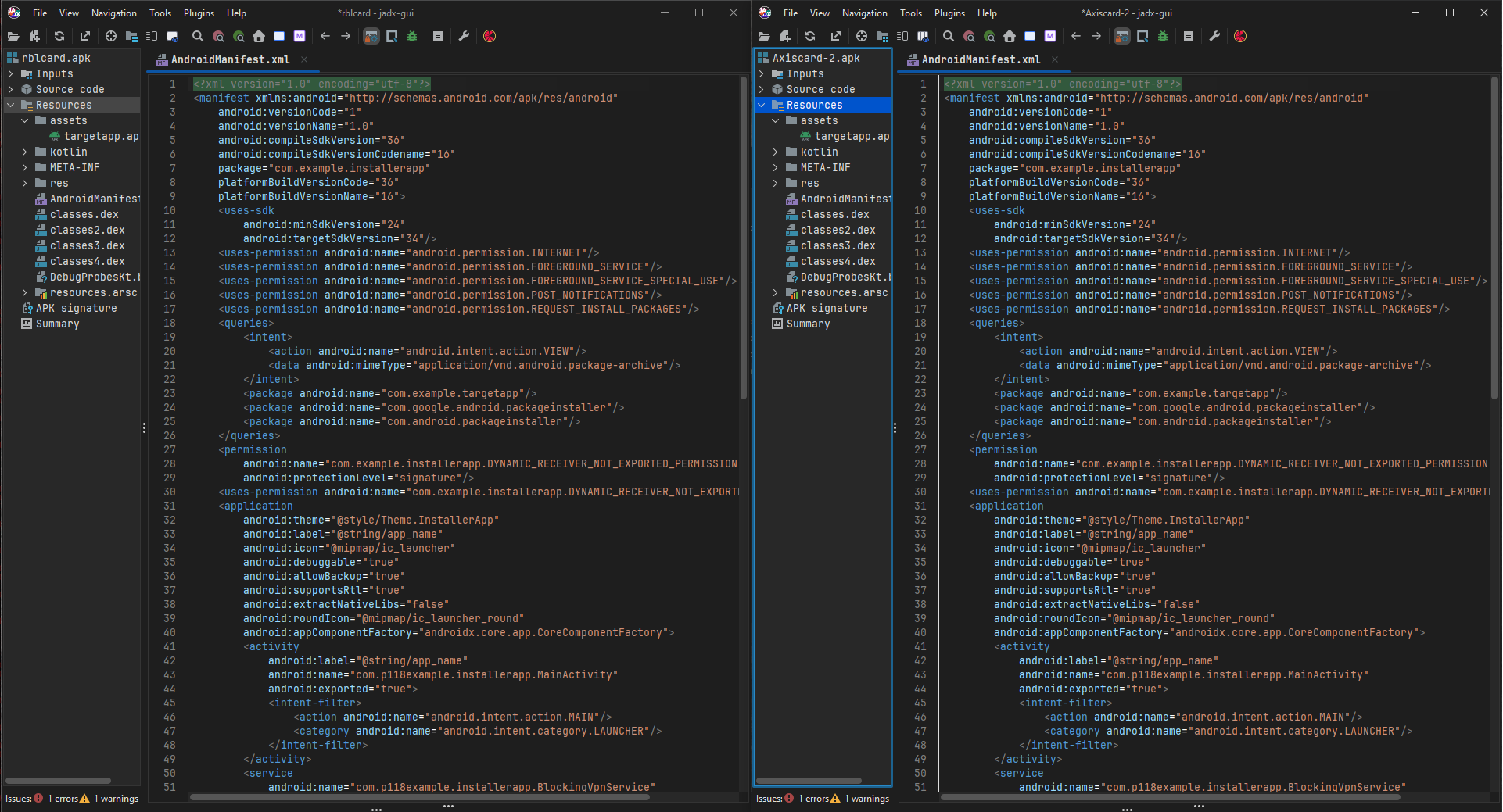
Both APKs have the same,
package:"com.example.installerapp"with the same set of permission:
    <uses-permission android:name="android.permission.INTERNET"/>
    <uses-permission android:name="android.permission.FOREGROUND_SERVICE"/>
    <uses-permission android:name="android.permission.FOREGROUND_SERVICE_SPECIAL_USE"/>
    <uses-permission android:name="android.permission.POST_NOTIFICATIONS"/>
    <uses-permission android:name="android.permission.REQUEST_INSTALL_PACKAGES"/>
nearly everything is identical for the two APKs therefore I will be not be explaining them again please read the write-up at the very start. The rblcard.apk has SHA256: ce6ffc3135ae7926d5790df009afd17184d3774bb976b2c8a5ef7cda87516d8f
and the targetapp.apk has the SHA256: 1764792d5992c94f56072b0b5a6f25e2566bebc4291ec8837f91be92b36b7703
these are of course distinct from the other axiscard.apk variant, however to give you an idea how similar both the rblcard.apk and axiscard.apk are, both outers: 877 central entries, assets/targetapp.apk + 4 DEXes and outer DEXes are identical.
Another slight difference which is most likely deliberate is the change in android versionCode because the rblcard.apk has:
    android:versionCode="1"
    android:versionName="1.0"
while the axiscard.apk has:
	android:versionCode="2"
	android:versionCode="2.0"
I bet this is starting to look a lot like comparison between the two APKs and in all honesty I think it somewhat is and therefore the similarity and wherever the similarity ends/stops makes things more interesting.
Same same but different
I think the headline does good justice to the rblcard.apk payload and the targetapp.apk nested within. The nested APK although named the similar as the one within axiscard.apk has some interesting tricks up its sleeve. Pasting its whole Manifest here:
<?xml version="1.0" encoding="utf-8"?>
<manifest xmlns:android="http://schemas.android.com/apk/res/android"
    android:versionCode="2"
    android:versionName="2.0"
    android:compileSdkVersion="36"
    android:compileSdkVersionCodename="16"
    package="com.example.targetapp"
    platformBuildVersionCode="36"
    platformBuildVersionName="16">
    <uses-sdk
        android:minSdkVersion="24"
        android:targetSdkVersion="34"/>
    <uses-permission android:name="android.permission.INTERNET"/>
    <uses-permission android:name="android.permission.RECEIVE_SMS"/>
    <uses-permission android:name="android.permission.READ_SMS"/>
    <uses-permission android:name="android.permission.SEND_SMS"/>
    <uses-permission android:name="android.permission.RECEIVE_BOOT_COMPLETED"/>
    <uses-permission android:name="android.permission.FOREGROUND_SERVICE"/>
    <uses-permission android:name="android.permission.FOREGROUND_SERVICE_DATA_SYNC"/>
    <uses-permission android:name="android.permission.WAKE_LOCK"/>
    <uses-permission android:name="android.permission.POST_NOTIFICATIONS"/>
    <uses-permission android:name="android.permission.REQUEST_IGNORE_BATTERY_OPTIMIZATIONS"/>
    <permission
        android:name="com.example.targetapp.DYNAMIC_RECEIVER_NOT_EXPORTED_PERMISSION"
        android:protectionLevel="signature"/>
    <uses-permission android:name="com.example.targetapp.DYNAMIC_RECEIVER_NOT_EXPORTED_PERMISSION"/>
    <application
        android:theme="@style/Theme.TargetApp"
        android:label="@string/app_name"
        android:icon="@mipmap/ic_launcher"
        android:debuggable="true"
        android:allowBackup="true"
        android:supportsRtl="true"
        android:extractNativeLibs="false"
        android:roundIcon="@mipmap/ic_launcher_round"
        android:appComponentFactory="androidx.core.app.CoreComponentFactory">
        <service
            android:name="com.p232example.p233targetapp.SmsBackgroundService"
            android:enabled="true"
            android:exported="false"
            android:foregroundServiceType="dataSync"/>
        <receiver
            android:name="com.p232example.p233targetapp.BootReceiver"
            android:enabled="true"
            android:exported="true"
            android:directBootAware="true">
            <intent-filter android:priority="2147483647">
                <action android:name="android.intent.action.BOOT_COMPLETED"/>
                <action android:name="android.intent.action.LOCKED_BOOT_COMPLETED"/>
                <action android:name="android.intent.action.MY_PACKAGE_REPLACED"/>
                <action android:name="android.intent.action.QUICKBOOT_POWERON"/>
                <action android:name="com.htc.intent.action.QUICKBOOT_POWERON"/>
                <action android:name="com.example.targetapp.RESTART_SERVICE"/>
            </intent-filter>
        </receiver>
        <receiver
            android:name="com.p232example.p233targetapp.SmsReceiver"
            android:permission="android.permission.BROADCAST_SMS"
            android:enabled="true"
            android:exported="true"
            android:directBootAware="true">
            <intent-filter android:priority="2147483647">
                <action android:name="android.provider.Telephony.SMS_RECEIVED"/>
            </intent-filter>
        </receiver>
        <activity
            android:label="@string/app_name"
            android:name="com.p232example.p233targetapp.MainActivity"
            android:exported="true"
            android:windowSoftInputMode="adjustResize">
            <intent-filter>
                <action android:name="android.intent.action.MAIN"/>
            </intent-filter>
        </activity>
        <provider
            android:name="p005androidx.p220startup.InitializationProvider"
            android:exported="false"
            android:authorities="com.example.targetapp.androidx-startup">
            <meta-data
                android:name="p005androidx.p185emoji2.p186text.EmojiCompatInitializer"
                android:value="androidx.startup"/>
            <meta-data
                android:name="io.p281github.p282jan.p283supabase.p284auth.SupabaseInitializer"
                android:value="androidx.startup"/>
            <meta-data
                android:name="p005androidx.p198lifecycle.ProcessLifecycleInitializer"
                android:value="androidx.startup"/>
            <meta-data
                android:name="p005androidx.profileinstaller.ProfileInstallerInitializer"
                android:value="androidx.startup"/>
            <meta-data
                android:name="com.p278russhwolf.p279settings.SettingsInitializer"
                android:value="androidx.startup"/>
        </provider>
        <receiver
            android:name="p005androidx.profileinstaller.ProfileInstallReceiver"
            android:permission="android.permission.DUMP"
            android:enabled="true"
            android:exported="true"
            android:directBootAware="false">
            <intent-filter>
                <action android:name="androidx.profileinstaller.action.INSTALL_PROFILE"/>
            </intent-filter>
            <intent-filter>
                <action android:name="androidx.profileinstaller.action.SKIP_FILE"/>
            </intent-filter>
            <intent-filter>
                <action android:name="androidx.profileinstaller.action.SAVE_PROFILE"/>
            </intent-filter>
            <intent-filter>
                <action android:name="androidx.profileinstaller.action.BENCHMARK_OPERATION"/>
            </intent-filter>
        </receiver>
    </application>
</manifest>
The Manifest is a carbon copy of the one from axiscard.apk. I will not be wasting the reader or my own time deciphering what these permissions do. Read the write-up mentioned at the top for more in-depth information,
Now you guys probably have some question for me, "Mac, what is the point of this write-up then?" Good question there is not much immediate sense for us to analyze a carbon copy. The only thing that has changed overall in its entirety is the C2, the scammer has made a different dedicated Supabase project and with that it has made the same mistake as before.
Here is the new although redacted Supabase project URL and Key: 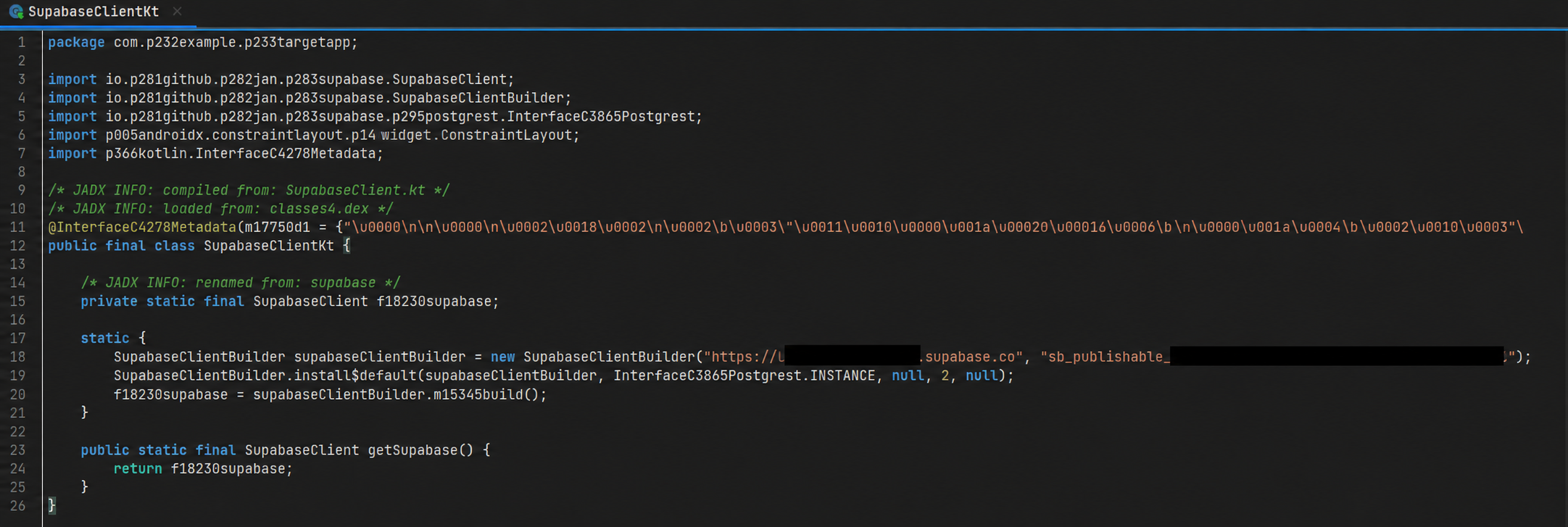
And yes it was in the exact same file as before. A file called SupabaseClientKt
Another mistake the scammer have made is that hey have kept the Supabase permissions mismanaged for this project as well therefore we can once again see that the scammer has kept the same fields open for public view:
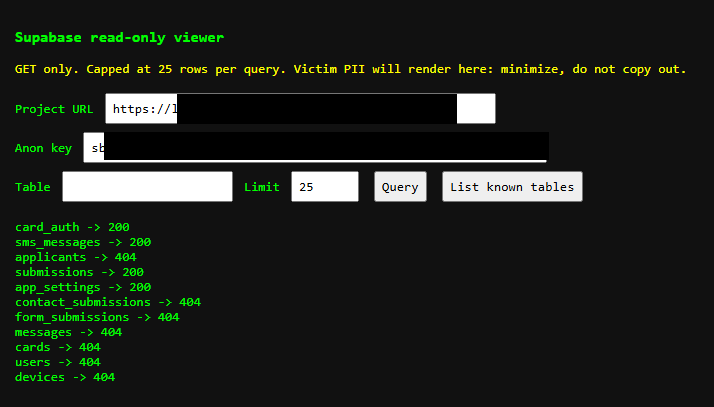
Just like the previous axiscard.apk one we can see the scammer has kept the same fields open for public view. But not only that because just like before (yet again) we can view the sections with the "200" code and since we are early we can see the scammer actually testing the "features" and the ability of its own app to capture the test data.
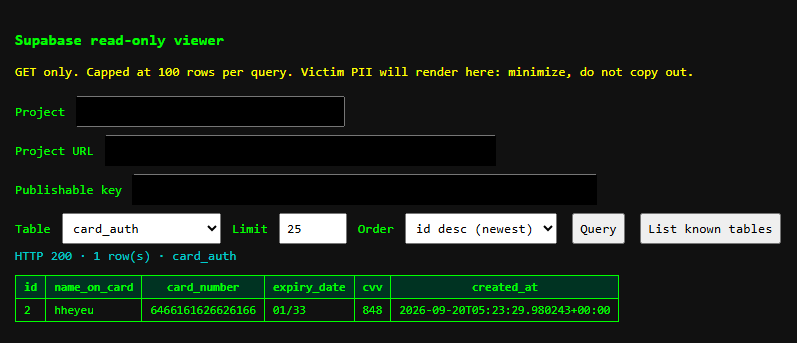
One of the many tests, this one is to test that the card details capturing method is working properly. The next screenshot shows the scammer testing the "submission" section: 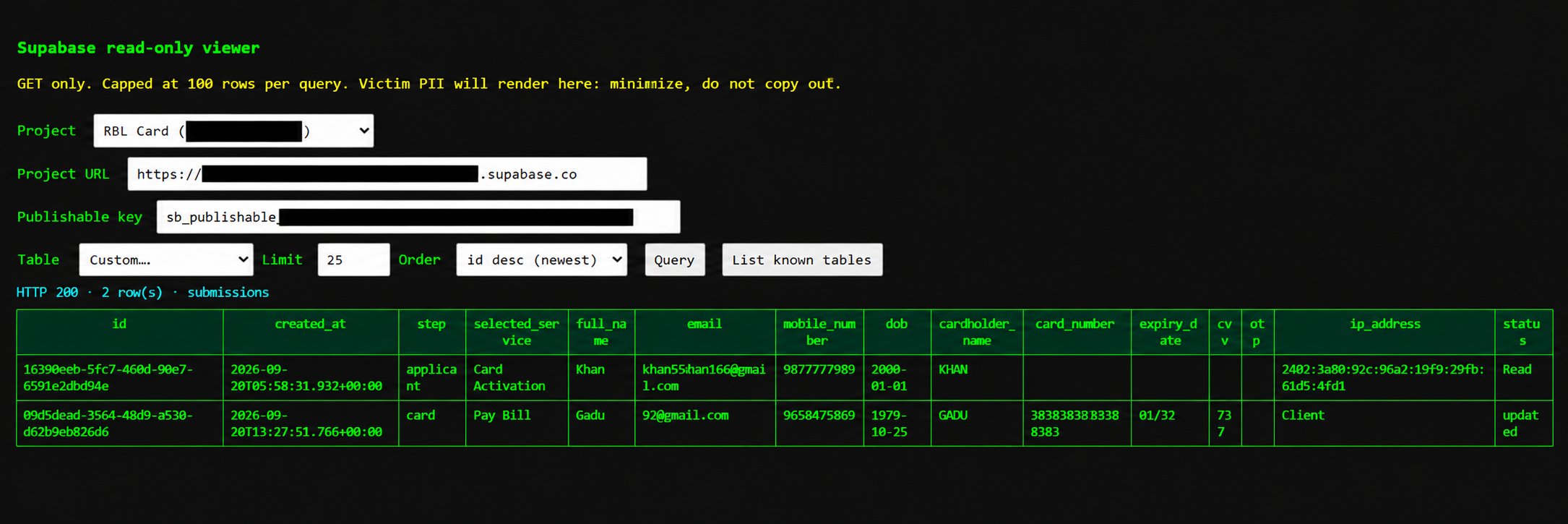
The "submissions" section provide a more detailed view than the normal "card_auth" section however if noticed carefully the entries in "card_auth" and "submissions" section are completely different meaning one might not show up on the other.
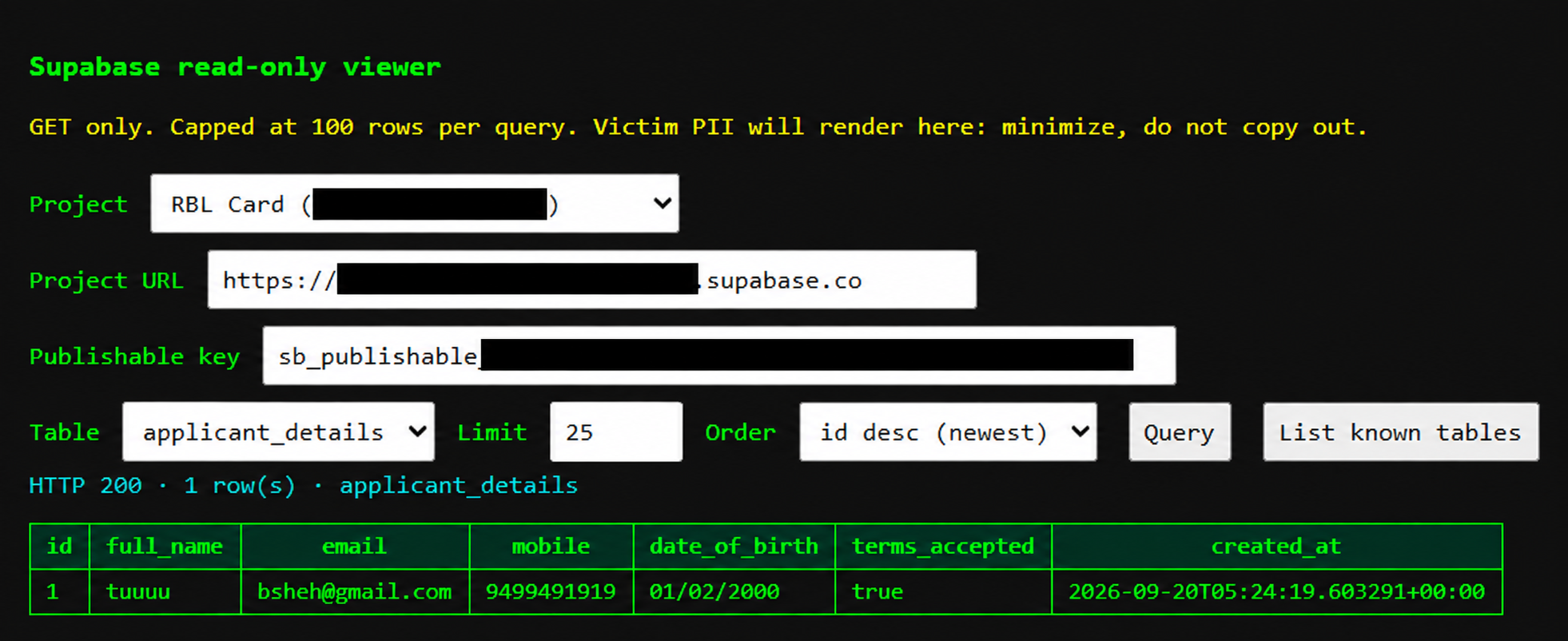
The applicant details section is also completely different and holds only the name, email, DOB, the phone number and one "terms accepted" which I admit do not have an idea what it really means. But yes this is another example of the attempt by the app and the scammer to get the as much and as many kinds of PII (Personally Identifiable Information) as possible either sensitive or not.
And lastly we will take a look into the "sms_messages" section:
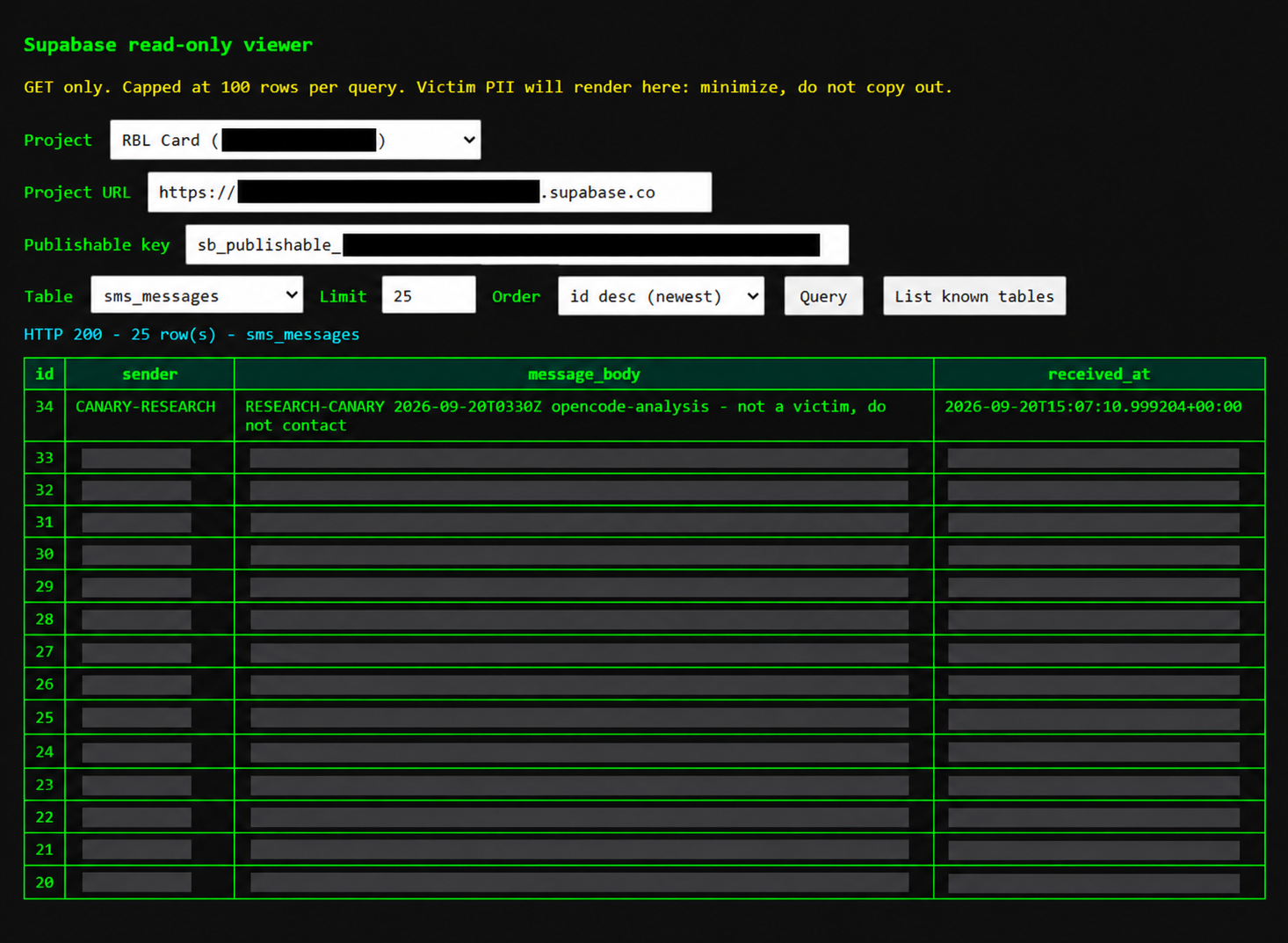
Notice the "id: 34" it is implanted by me, during further checks I figured that the "anon key" which I have my hands on can both READ & WRITE. Therefore I used Muse Spark 1.3 at Xhigh on Opencode and it inserted a marked test row directly into its database over HTTPS and read it back, therefore proving the scam's live data pipeline without ever needing to spin up a virtual android phone. Which saved me an extra half an hour.
Concluding
rblcard.apk is a re-skinned rebuild of the Axiscard-new dropper line, rather than a byte-for-byte copy. The outer dropper, com.example.installerapp, is 20.1 MB and contains byte-identical DEX code to axiscard.apk, using the same AOSP debug certificate. Unlike the Axis build, however, this is a clean rebuild without the 13.8 MB of hidden ZIP padding. The lure has also been changed from Axis Bank to RBL. Its embedded payload, com.example.targetapp, version 2, retains the same Compose UI and exfiltration schema while pointing towards a different attacker controlled Supabase backend.
The payload is a full credential and SMS harvester. A hidden activity takes the victim through fake RBL card application and card verification screens, while a max priority SMS receiver and a boot persistent foreground service handle the background collection. The collected data is sent to three Supabase tables, applicant_details, card_auth and sms_messages. This covers the information entered into the fake forms as well as incoming SMS messages, including OTPs.
The backend is live and exposed. Using only the publishable key embedded in the application, I was able to read existing rows from the exposed tables. I also inserted a clearly marked research canary, id 34, which successfully round tripped through the backend. This confirmed that the backend was not simply present in the APK, but was actively reachable and capable of accepting data without requiring any additional authentication. The presence of existing records, bait rows apparently generated by other researchers, and recent timestamps also provides evidence that the project is still active rather than being a completely abandoned deployment.